Electron principles / concepts
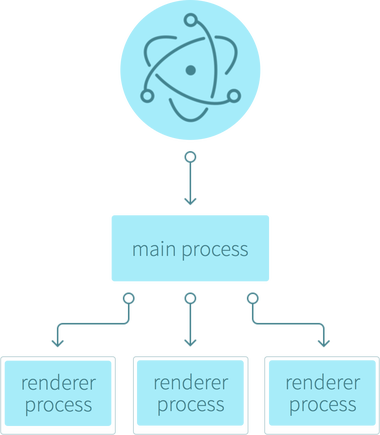
Basically Electron is divided in two parts : The renderer process and the main process.
When we launch an Electron app, a main process will spawn, this process is able to launch renderer processes.
In other words, the main process will be the core of your app, and the renderer your app windows.
It is possible to do a "dangerous" parallel the web world : Your main process is like the "back-end" of your app, and the renderer "the client side of the app. With the difference that with Electron the "back-end" is found on your machine
Main process
When we launch your app, a main process will spawn : Basically the main process is a node.js thread. In this process you will make all the "low-level" operation with the host machine, ex : writing files, access to native system APIs.
This node.js process give you access to :
- All the native node.js modules (like 'fs' or 'path')
- Electron modules (ex : notification, to interact with native OS notification system)
- Other imported modules
In this process you will be able to spawn renderer process.
Renderer process
The renderer process will be executed in a new window, exactly like javascript in our web page.
When the main spawn a renderer process, a new window will be launched, this window is simply a sandboxed web-page rendered by the chrome engine. It gives you acces to all the last web "functionalities" like HTML5, CSS grid or flexbox, es6 javascript (Another advantage, is not necessary to make polyfill to support all browser. In all the platforms, electron will use the same render engine.)
Note on javascript, the renderer process also execute the javascript with the node.js engine, so it gives you access to all the node.js modules directly on the renderer process, but by principle we don't use "low-level" modules in the renderer.
Interaction principles
An example of interaction between main and renderer process :
- You start the app
- A main process spawn
- Then the main will spawns a renderer process
- The user makes actions on the renderer, he wants to save a file
- The renderer will sends a request to the main to show a native save dialog and saves the file
- The main will calls the electron module who takes access to the native dialogs
- The user selects a folder in the dialog
- The main will saves the file with the 'fs' node module, then send a success message to the renderer
- The renderer displays to the user the message
IPC
To interact between main and renderer process, electron provides a custom protocol : ipc.
Ipc provides a simple way to send events with datas between main and renderer.