Vue.js principles / concepts
Vue.js is a progressive framework to build web interfaces, like React, Angular, Ember and others. Vue is progressive, in other therms, it is designed to be progresively integrated in an existant website. Vue is focused on a lightweight core library with just the "engine", if you want specific functionalities you can easily import new modules or create them.
Vue is also designed to build single page applications.
Declarative rendering
One main concept of vue.js is declarative rendering. Vue enables you to declaratively render datas in the dom :
<div id="app">
  {{ message }}
</div>
var app = new Vue({
  el: '#app',
  data: {
    message: 'Hello Vue!'
  }
})
In this example, the message props will be automatically bind in the DOM, and replaced by his value. Then Vue will automatically updates the view when the massage value changes.
You can also use directive (key words) to make conditional rendering, like many templates engines.
Reactive
Vue.js is reactive, he can graft observers on the properties you declare in the vue instance, then automatically detect changes and reactively update the view.
Ex :
<div id="app-6">
  <p>{{ message }}</p>
  <input v-model="message">
</div>
var app = new Vue({
  el: '#app',
  data: {
    message: 'Hello Vue!'
  }
})
In this example, the v-model directive will indicate Vue to observe the input field. On update the "message" data will be automatically updated, and the view vill be re-rendered. example in the official doc
If you type "A", it will be instantly rendered on the paragraph.
Component oriented
Vue.js allows you to separate your application in little components. The interest is to create autonomous components maintainable and reusable.
Then you compose your web page with your components.
Ex : in my website I have many custom datepickers. The problem is : This datepicker needs a lot of CSS to display it, and many logic to generates the dates an parse it.
You can create a component named "datepicker", it will embarks its own CSS style as well and it's own logic.
Then, I simply can reuse this components in many pages on my website, and even reuse this component in an other website, because it is autonomous.
Vue.js includes many others functionalities, see the documentation if you want more infos.
Single file components
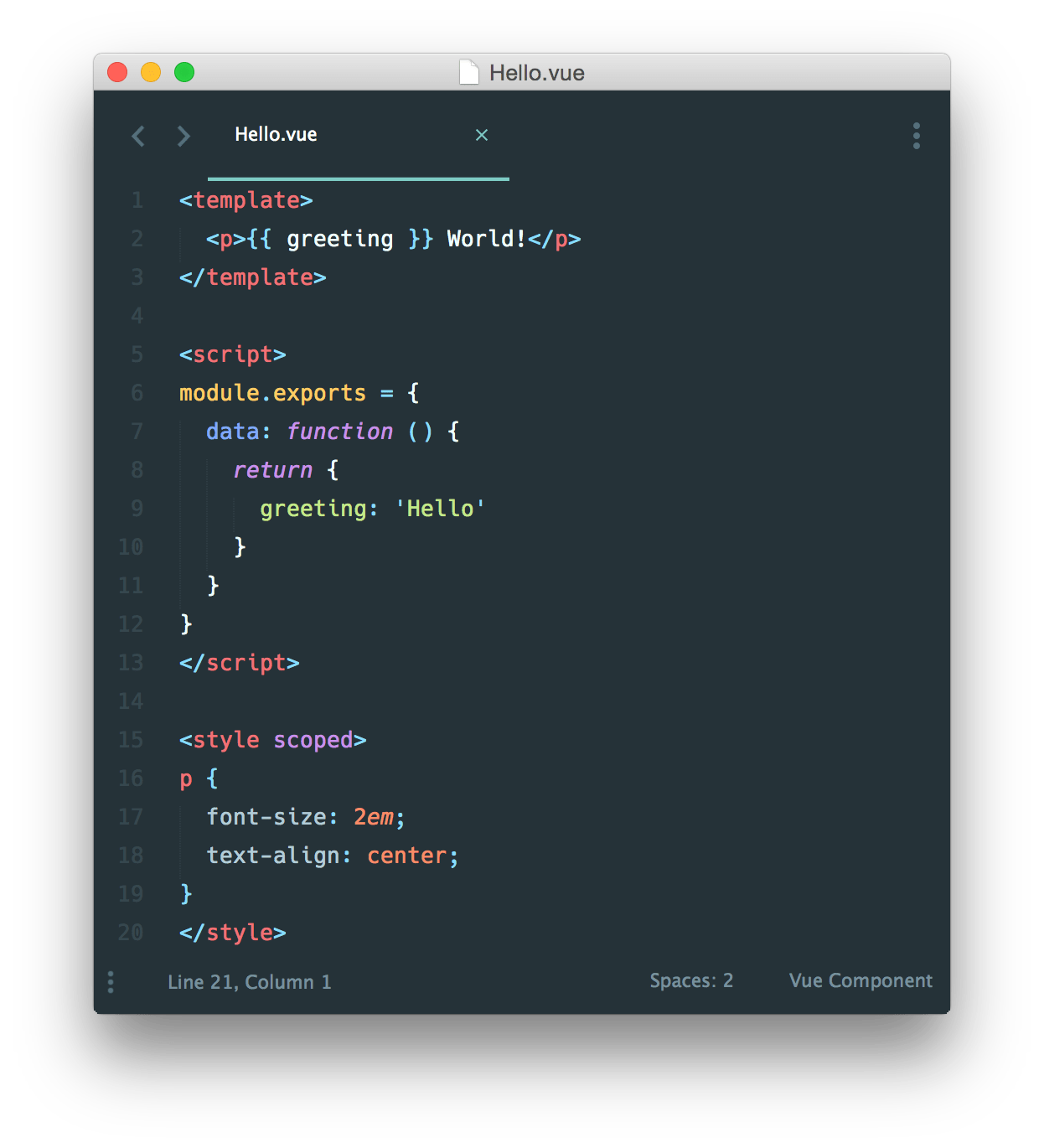
To work properly with components, vue provides a webpack loader called vue-loader to create files that represent a component. These files become embedded all the information related to the component.
- template The html elements of this component
- script The logic of the component
- style And the specific CSS style for the component
Note : for big components it's possible to split the tree sections in separate files.
With this files its also really simple to share components.
After creating a component, it is possible to call the components in the view, and Vue will automatically replaces its tag by his template and set the componenet logic.
<hello></hello>
Here i call the components in the top picture.
Vue-router
Vue-router is a official Vue library to provides client-side routing.
Example : in normal context, you call a web page, the server will returns you the entire new page, you click on a link, the server return to you the entire new page.
With client-side routing, the routing will be done by javascript on the client machine. When you click on a link, vue-router will simply replaces the actual component by the component representing the page you call.
Vue X
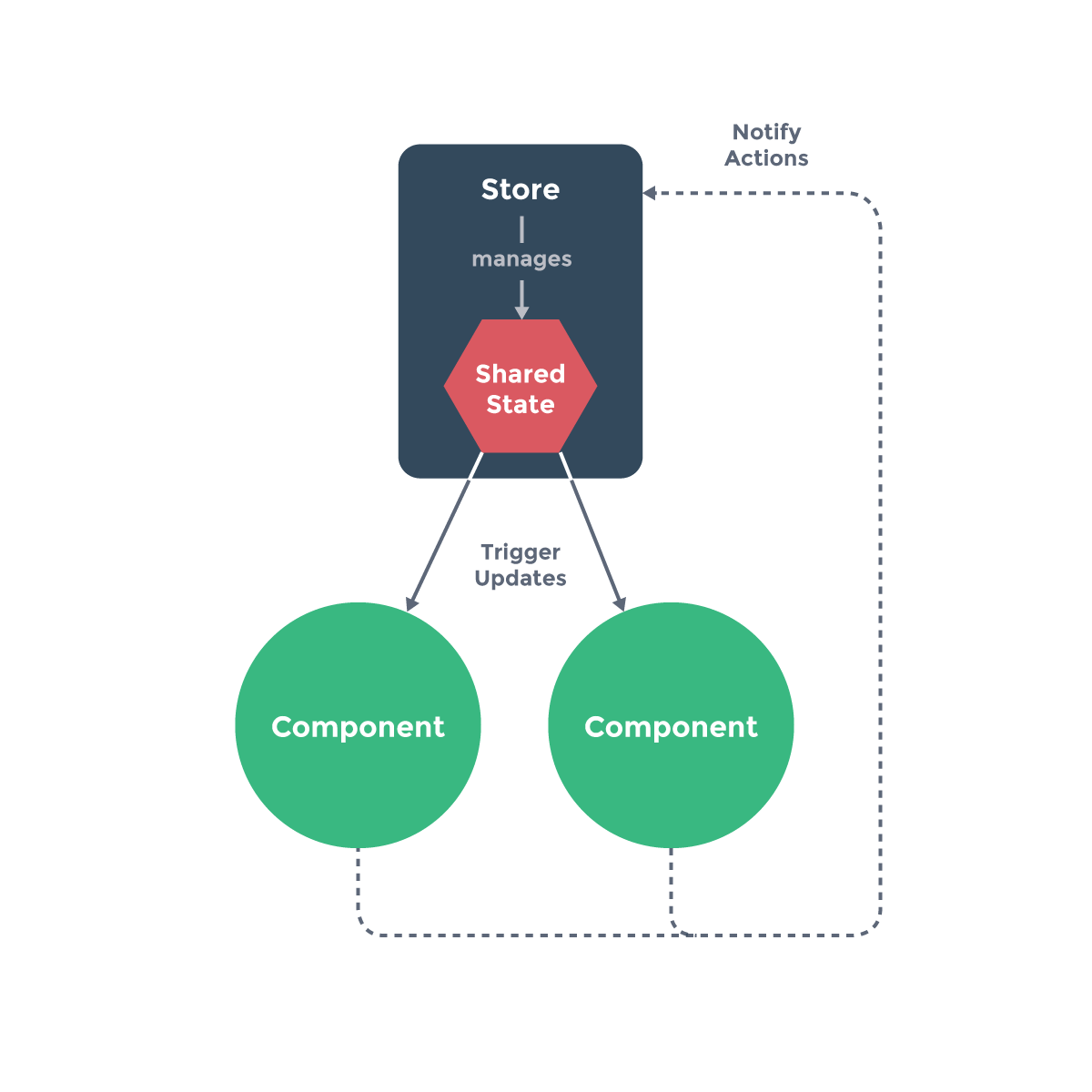
The problem when we use many components is the state managment. The best example is facebook.
When I receive a new message, many components in the page will be updated : the top notification bar, the messages list, and even the message box.
The problem, these components are all isolated. If the message box receive the new message, he is complicated to update the top bar from the notification box.
In this case, the message box will notifies the new message to his parent component, etc. then the information will back down to the top bar component by an other way.
This operation triggers many events, and unnecessarily load the javascript.
State managment will solve this problem. With Vue we create a global state for all the app, when a component receives a new update, he commits this modification in the global state, then all the components that are subscribed to this state will be automatically updated.
VueX is inspired from the Flux patern.
Element-ui
Element-ui is a Vue framework that provides user interface components to easily build apps. All the components
Vue.js ressources
All the pictures are from the official vue.js documentation.